
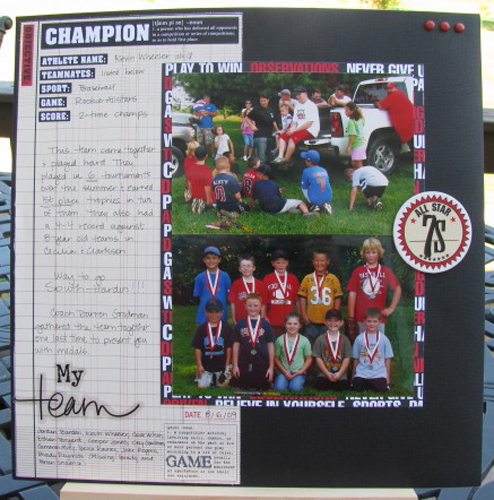
Highlight those Team Photos with this great layout idea by Amy Wheeler, Design Team Member.
Supplies
- Teresa Collins – Sports Edition – Tags Sports Defined
- Teresa Collins – Sports Edition – Chipboard Charms
- MLYB – Say What? Clear Cuts Sticker Words – Sports
- Black Cardstock
- Black alphabet stickers
- Red brads
Step-by-step directions:
- Start with a sheet of 12×12 black cardstock
- Cut large “Champion” card out of Teresa Collins – Sports Edition – Tags Sports Defined paper
- Adhere Champion card to cardstock
- I used two landscape 4×6 photos for this layout, so I cut a piece of the Teresa Collins – Sports Edition – Tags Sports Defined paper to 8.5” x 6.5” (cut patterened paper ½” longer than your photo measurements)
- I adhered by photos to the photo mat, and adhered them to my layout overlapping the Champion card and allowing a 1.5” space on the right side
- Next, I took the “all star” chipboard circle from the Teresa Collins – Sports Edition – Chipboard Charms
- I adhered the chipboard circle where my two 4×6 photos met, allowing it to overlap both photos
- I added “7s” to the center of the chipboard circle using stickers from my personal stash
- Using the stickers “My” and “Team” from MLYB – Say What? Clear Cuts Sticker Words – Sports I added the title for my page in the lower right section of the Champions card
- After journaling on the Champion card, to complete my layout, I added a row of three red brads (from my personal stash) to the upper right hand corner
Click Here for printable instructions and to order all the products you’ll need to complete this layout.
(Visited 45 times, 1 visits today)
this is fantastic! I love how you journaled on the TC paper & how it frames the photo!